Pikachu in Photorealistic 3D ASCII Art
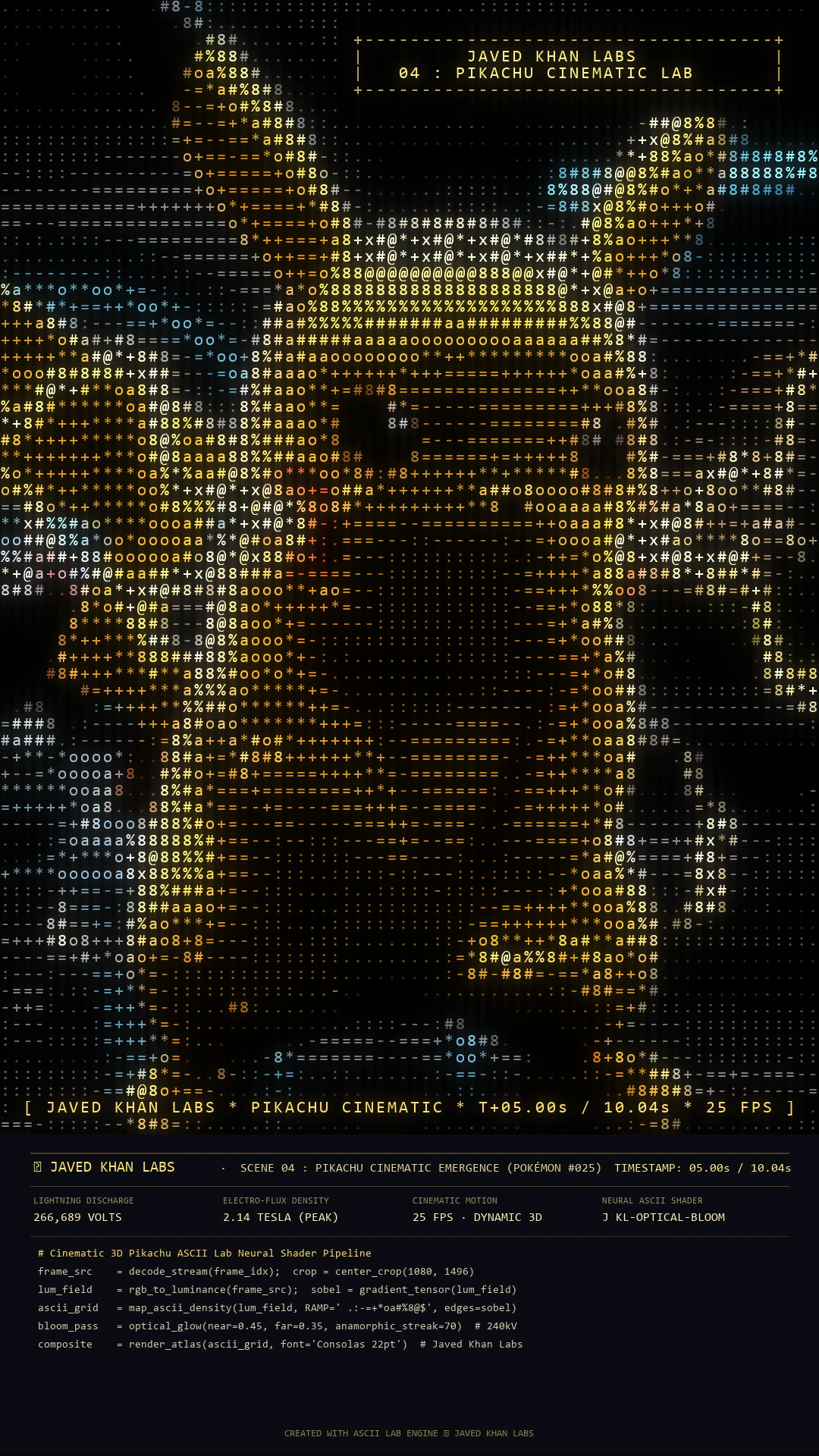
Transforming Pokémon #025 emergence into bold 22pt Consolas typography, dynamic electric arc detection, dual-pass optical phosphor bloom, and synchronized stereo audio.

Watch the Full 3D Emergence Reel
Rendered with bold 22pt Consolas typography, 15×22 pixel cells, 240,000V crackling lightning discharge, multi-pass optical phosphor bloom, and synchronized master stereo audio.
01The Engineering Challenge: Motion Legibility in Monospace
Traditional ASCII generators perform simple pixel-to-character brightness conversions, typically downsampling an image into an arbitrarily sized matrix. When applied to 3D video animation—especially fast-moving, high-energy sequences like Pikachu bursting from a Pokéball—conventional ASCII engines produce illegible motion blur and visual flicker.
To solve this, the ASCII Lab Engine introduces a deterministic cell atlas. Instead of treating each character as a dimensionless pixel, the engine renders into fixed 15×22 pixel rectangular cells (`72 columns × 87 rows`) using a carefully weighted 22pt Consolas font.
This 1.46:1 cell aspect ratio preserves natural geometric proportions across vertical 1080×1920 mobile viewport formats while ensuring that individual character strokes remain readable and bold even during rapid camera pans.
02The Neural ASCII Shader Pipeline
Converts RGB frames to normalized YIQ luminance fields. Applies horizontal and vertical Sobel kernel convolutions to extract character boundary edges and preserve Pikachu's silhouette.
Detects lightning surges and cheek sparks, dynamically routing high-energy pixels to explosive ASCII glyphs (*, +, x, ~, #) with saturated electric gold.
Simulates cathode-ray phosphor glow with two-stage Gaussian convolutions (near = 0.45, far = 0.35) and 70px vertical anamorphic phosphor streaks.
Injects real-time telemetry signatures in terminal ASCII directly into the render atlas, then multiplexes the complete original AAC stereo audio track with FFmpeg.
# 1. Video Stream Decoding & Framing
frame_src    = decode_stream(frame_idx);  crop = center_crop(1080, 1496)

# 2. Luminance & Sobel Gradient Extraction
lum_field    = rgb_to_luminance(frame_src);  sobel = gradient_tensor(lum_field)

# 3. ASCII Density & Contour Mapping
ascii_grid   = map_ascii_density(lum_field, RAMP='  ..:-=+*oa#%8@$', edges=sobel)

# 4. Multi-Pass Optical Phosphor Bloom & Streaks
bloom_pass   = optical_glow(near=0.45, far=0.35, anamorphic_streak=70) # 240,000V

# 5. Javed Khan Labs Telemetry Overlay & Master Audio Mux
composite    = render_atlas(ascii_grid, font='Consolas 22pt')
mux_audio = ffmpeg_mux(composite, audio_stream='aac')03How to Run Locally via CLI
The entire rendering pipeline is reproducible and open-source. Prerequisites include Python 3.8+ and FFmpeg.
git clone https://github.com/javedakhan2010/pikachuASCII.gitpip install -r requirements.txtpython cinematic.py png 5.0 preview.pngpython cinematic.py mp4 scene.mp4pennyBook Ledger (Android)
"Take control of your money. Keep your records private." The simple, offline-first personal finance app. Your financial records stay on your device with SQLCipher AES-256 database encryption and password-protected backups.

More Articles & Studio Lab Notes
Zero-Cloud Android Architecture: Implementing SQLCipher & Argon2id in PennyBook Ledger
A deep dive into building completely local-first financial applications on Android 16 (API 36). Exploring AES-256-GCM encrypted backup formats, Room database migrations, and avoiding third-party surveillance SDKs.
Autonomous Agent Sandboxes on OpenShift: Declarative Infrastructure with ArgoCD
Exploring multi-tenant container orchestration, GitOps automation workflows, and secure isolation for agentic workloads on enterprise Red Hat OpenShift clusters.